Every project, prompt, task, bug and launch.

The project tracker for apps you build with AI. All in one place.

Save the prompts that worked. Track tasks and bugs. Plan the launch. Then open any project and see exactly where you left off.

Create Your First Project

Free plan, no cardSet up in 30 seconds

Joint 3rd place · tiun × Microlaunch hackathon

Recipe Box

AppIn dev
14/23 tasks

Where you left off · 2 days ago

Last session 47 min
High

You were fixing: Safari login redirect loop

Bug · opened Oct 12 · 3 notes

Next

Add password reset email

Task · Medium · due Oct 18

Last prompt you used

Refactor the auth callback so it handles the Safari redirect without a second login

Works alongside the tools you already useClaude CodeCursorBoltLovablev0WindsurfChatGPT

Sound familiar?

AI makes building fast. Keeping track is the slow part.

“Which prompt fixed that bug last week?”

It’s buried in a chat thread you can’t find.

PromptsSave it once. Find it in seconds.

“Where was I on this project?”

You spend the first half hour working out what you were doing.

ResumeOne click back to your last session.

“Is this actually ready to launch?”

You find out about the missing privacy policy after you post.

LaunchesA checklist before you ship.

01 / Features

Everything a project needs. Nothing it doesn’t.

Prompts

A library of prompts that work

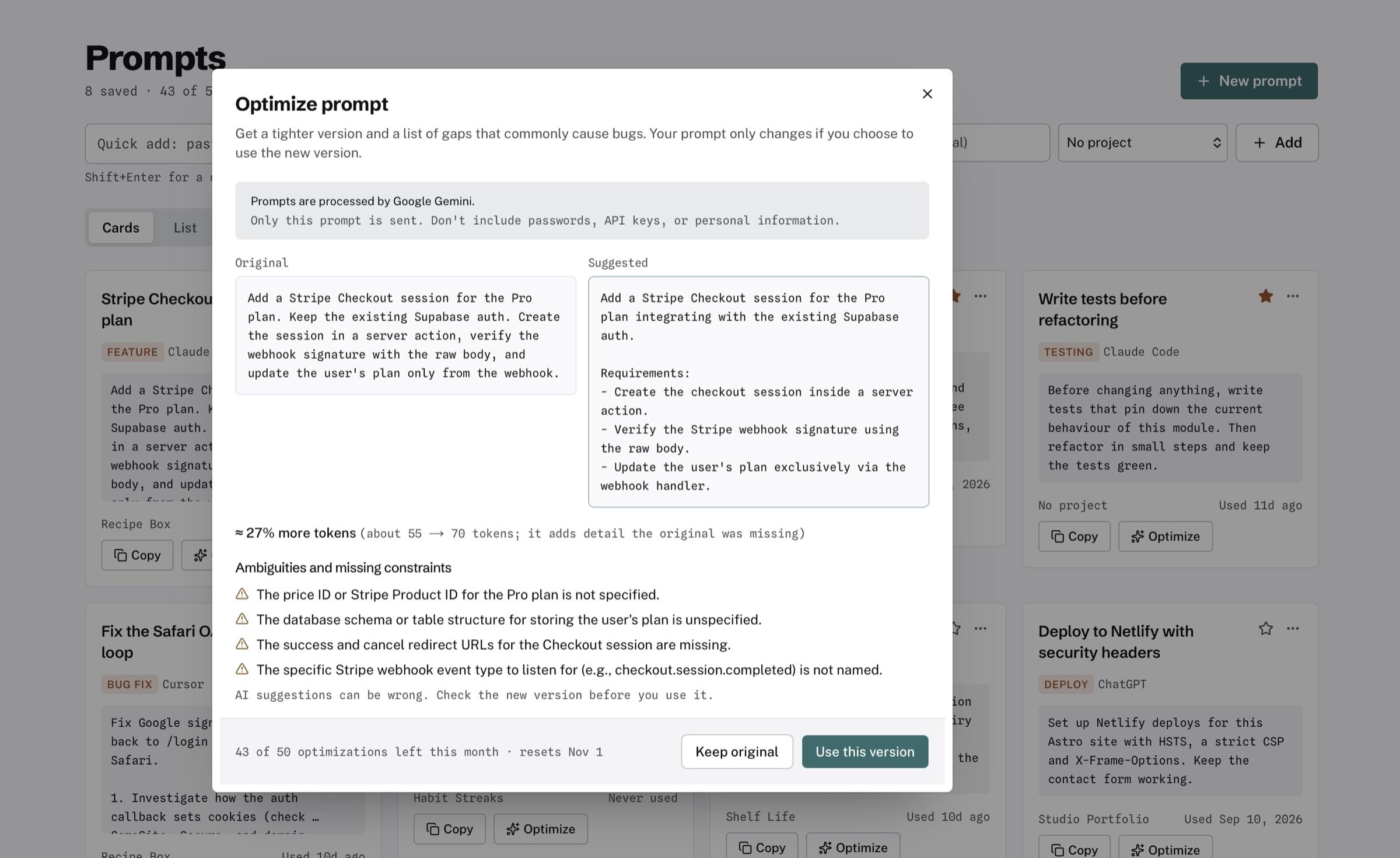
Save prompts per project, tag them, copy in one click. The Prompt Optimizer turns a rough idea into a clear prompt.

make the login work on safari

Optimized

Find why the Supabase login callback loops on Safari only. Explain the cause first, then change the fewest files needed.
Tasks

A to-do list for each project

Priorities, due dates and a simple board. Overdue work turns red so it can’t hide.

  • Write privacy policy2 days lateUrgent
  • Shopping list from recipesTomorrowHigh
  • Password reset emailOct 18Medium
Bugs

Bugs, sorted by how bad they are

Write down what broke and how to repeat it. Critical bugs stand out from everything else.

Critical1
High2
Medium4
Low3
Launches

Plan the launch, check it twice

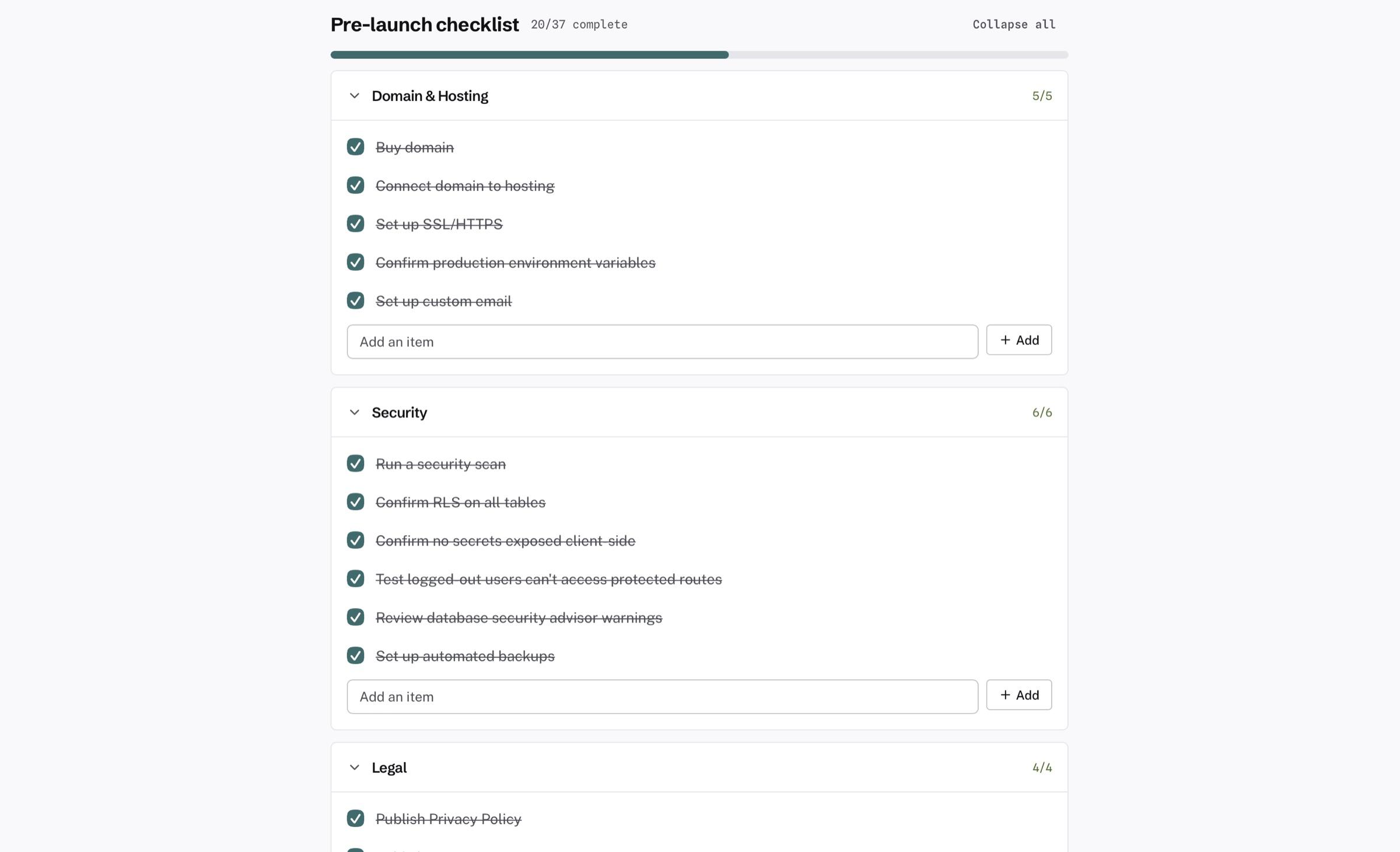
Set a date and a channel. The Pre-Launch Checklist covers the 37 things people forget.

Public betaNov 3
20 of 37 checks done
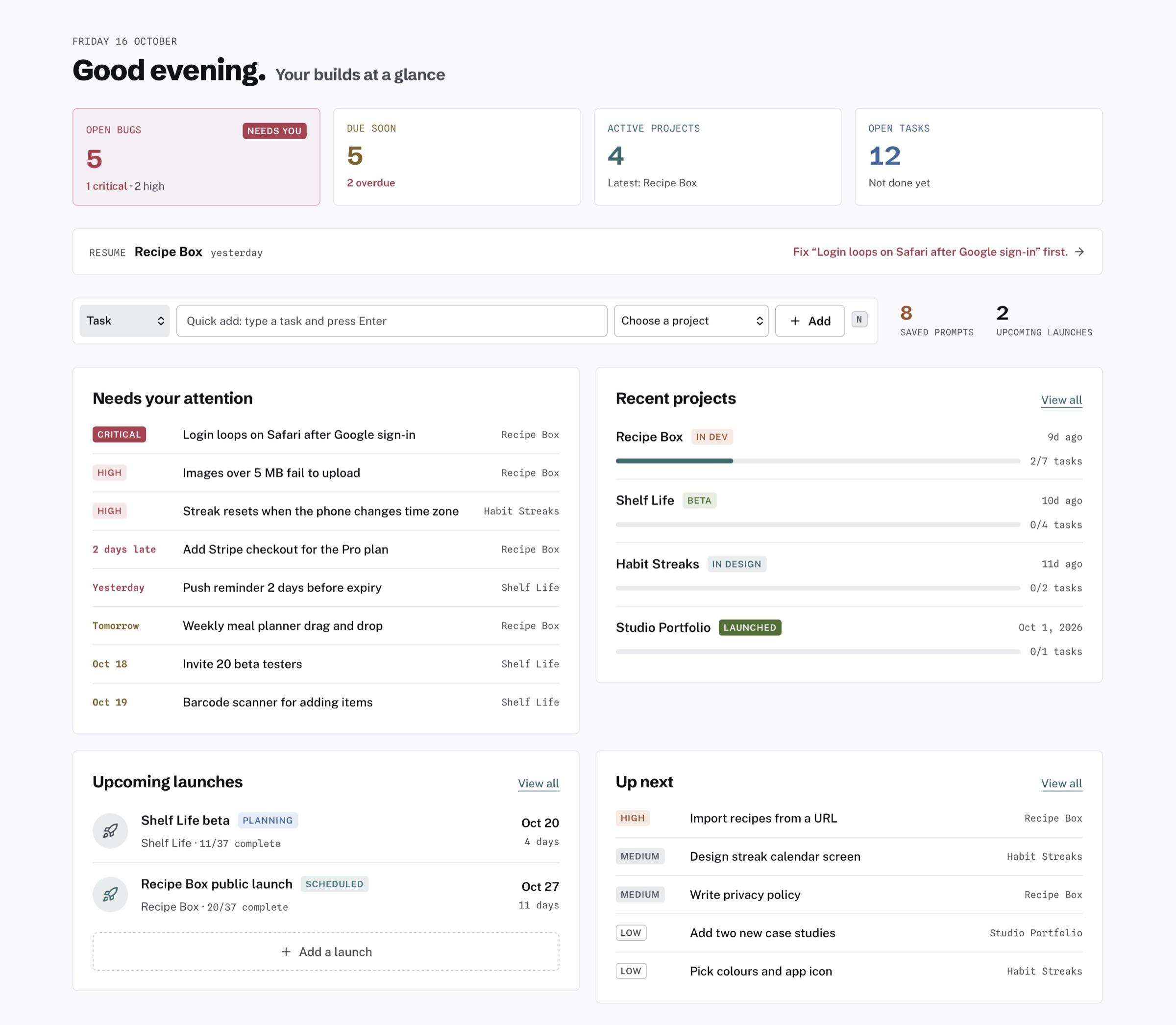
Dashboard

All your projects at a glance

The most urgent thing is always top left. Then what’s due, what’s next, and what’s launching.

Open bugs

3

Due soon

5

Projects

4

Tasks

38

Also included

  • Export everything — your data, any time, on every plan
  • Keyboard shortcuts — add a task or bug without the mouse
  • Dark mode — for the late-night sessions
  • Sign in your way — email or Google

02 / How it Works

Three steps. No setup.

No boards to configure, no sprints, no story points. Add a project and start.

  1. 01

    Add a project

    Give it a name, a type and a status. App, website, SaaS — anything you’re building.

  2. 02

    Log as you build

    Paste in prompts that worked. Add tasks. File bugs the moment you spot them.

  3. 03

    Come back anytime

    Hit Resume. See what you were doing, what’s next, and what’s broken.

It’s not a plugin or an MCP, and there’s nothing to install in your editor. PromptStack is a web app where you keep the prompts, tasks, bugs and launches for what you build.

03 / Resume Project

Close the laptop. Come back next week. Know exactly where you were.

Resume puts your last session, your next task and your open bugs on one screen. No scrolling through old chats to remember.

Where you left off · Recipe Box

Last opened Oct 14 · 9:42 pm
You were
Fixing the Safari login redirect loop. Narrowed it to the auth callback.
Next up
Add password reset emailDue Oct 18
Still broken
1 Critical2 High
Last prompt
Refactor the auth callback so it handles the Safari redirect
Try It Free

04 / Product tour

See it with real projects in it.

The screenshots below come from a real workspace with several projects on the go.

  1. 01

    Dashboard

    The most urgent thing sits top-left: critical bugs first, then overdue tasks.

    The PromptStack dashboard: five open bugs flagged first, tasks due soon, the Resume bar, items that need attention, recent projects with their progress, upcoming launches and what to work on next.
  2. 02

    Resume Project

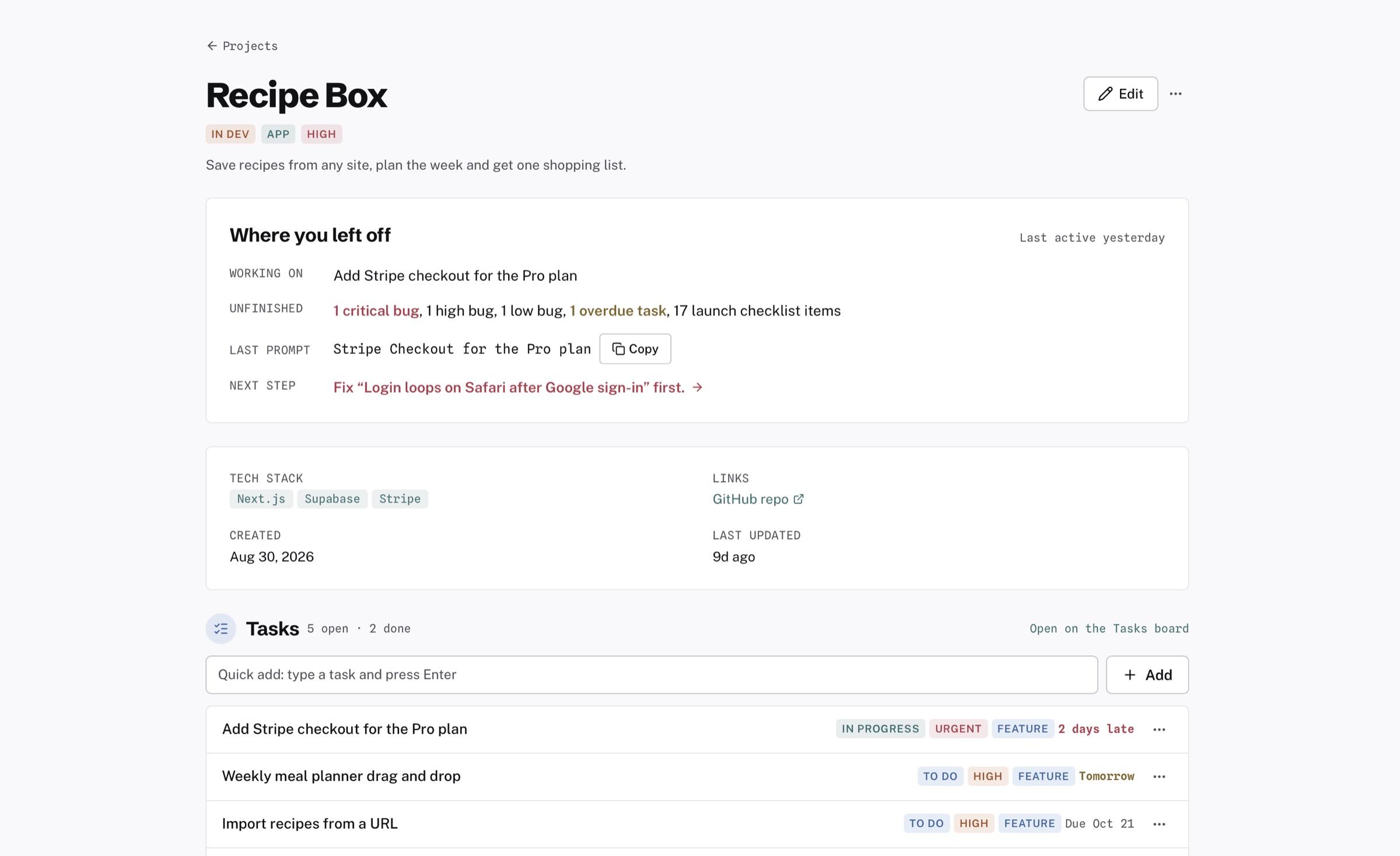
    A short note on what you were doing and what to do next.

    A project page opening with a Where you left off note: what you were working on, what's unfinished, the last prompt and the next step, above its details and tasks.
  3. 03

    Prompt Library

    Prompts tagged by tool, one-click copy, and the Optimizer’s before/after view.

    The prompt library with the Prompt Optimizer open, showing the original prompt, a suggested version and the gaps it found.
  4. 04

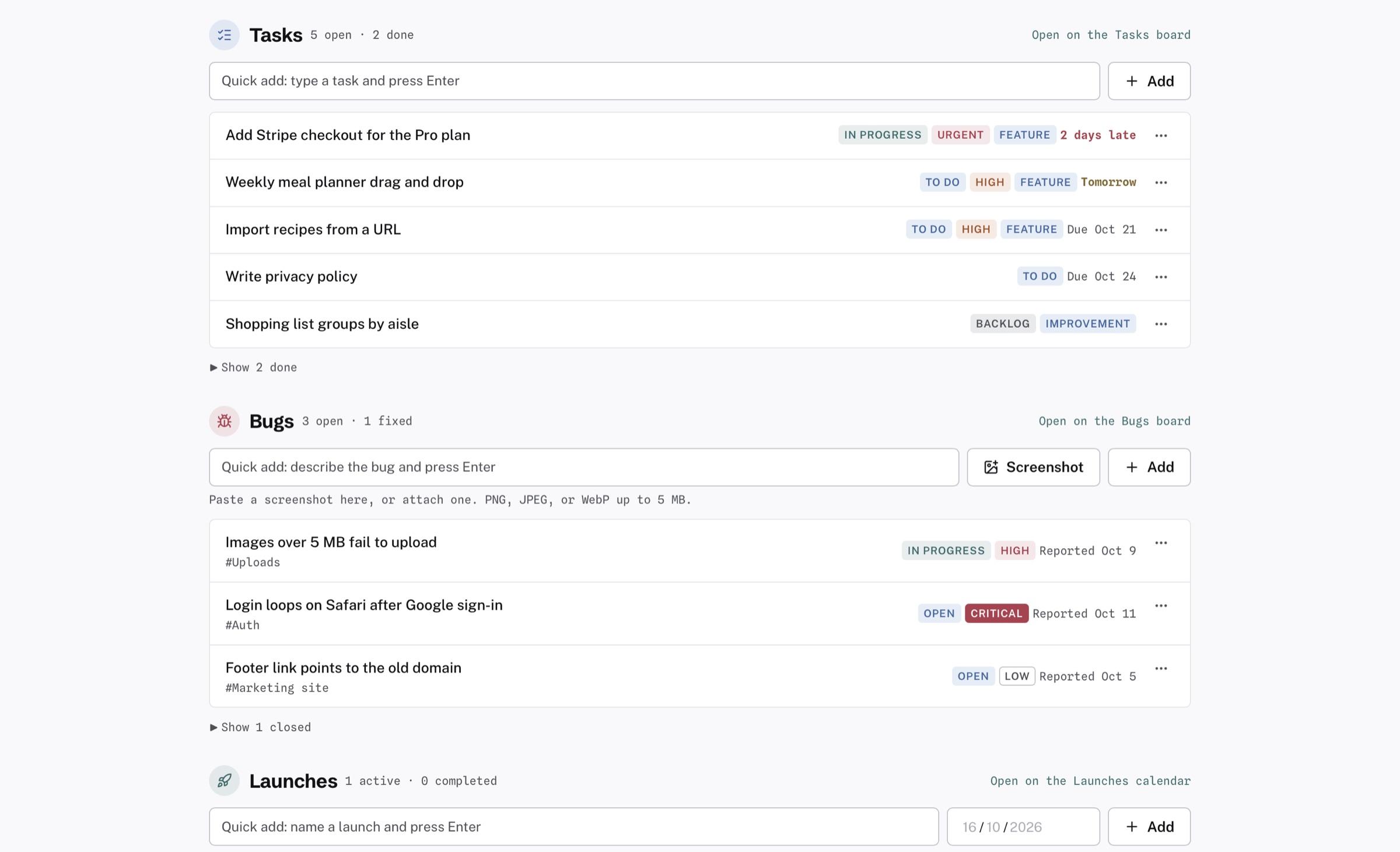
    Tasks & Bugs

    Every project’s tasks and bugs in one place, with priority and severity you can see at a glance.

    A project's tasks with status, priority and due dates, and its bugs with severity chips including one critical.
  5. 05

    Launch Checklist

    37 items grouped by area, with progress you can track to launch day.

    A launch's pre-launch checklist, 20 of 37 complete, with every Domain and Hosting and Security item ticked off.

05 / Recognition

Joint 3rd place, out of 100+ projects built in public.

PromptStack placed joint third in the first tiun × Microlaunch hackathon, a build-in-public challenge where makers shipped real products and shared every step in the open.

It’s still built that way: in the open, one release at a time, shaped by the people who use it.

Final placing
Joint 3rd
Projects in the running
100+
Designed and built by one person
Solo
tiun × MicrolaunchBuild-in-public hackathon

06 / About

Built by someone who kept losing the thread.

I build software with AI tools every day. Starting things was easy. Keeping track of them wasn’t. Prompts sat in old chats, bugs lived on sticky notes, and every time I came back to a project I had to work out where I’d stopped.

I built PromptStack for that. It’s the all-in-one place where your projects are waiting for you.

Renative Studiorenativestudio.com

07 / Pricing

Start free. Upgrade when you outgrow it.

Free

For trying it on a side project.

$0forever

  • 3 projects
  • 25 tasks and 5 prompts
  • Up to 5 open bugs
  • Resume Project
  • Export to Markdown and JSON
Start Free

Starter

For people shipping for real.

Recommended

$9per month

  • Unlimited projects, tasks, prompts and bugs
  • Launches + pre-launch checklist
  • Prompt Optimizer
  • Everything in Free
Get Starter

Creative

Everything in Starter, plus tools for designing what you build.

Coming soon

Waitlist

  • Design System Creator
  • Mockup Generator
  • PRD Builder
  • Inspiration Board

Cancel any time. Prices in US dollars. Your data stays exportable on every plan.

08 / FAQ

Questions, answered.

Can’t find what you need? Get in touch.

Is PromptStack an AI coding tool?

No. It doesn’t write code. It’s where you keep track of what you build with AI coding tools: the projects, the prompts that worked, the tasks, the bugs and the launches. You keep using Claude Code, Cursor, Bolt, Lovable or whatever you like.

Do I need to know how to code?

No. PromptStack never touches your code. If you build with no-code or AI tools, it works the same way: projects, prompts, tasks, bugs and launches, all in plain language.

Do I need to install anything or connect my editor?

No. PromptStack is a web app. It isn’t a plugin or an MCP server, and it doesn’t need access to your code. Sign up, answer three questions and you’re in.

Is the free plan actually free?

Yes. No card, no trial timer, and it doesn’t expire. You get 3 projects, 25 tasks, 5 prompts, up to 5 open bugs, Resume Project and export. Launches and the Prompt Optimizer come with Starter.

What happens if I hit a free limit?

When you try to add more, you’ll see a clear upgrade screen. Everything you’ve already saved stays where it is.

What does the Prompt Optimizer send to AI?

Only the prompt you choose to optimize. Google Gemini processes it, and on Google’s free tier Google may use it to improve its products, so don’t optimize anything confidential. You see a before and after and decide whether to keep it. PromptStack never overwrites your prompt on its own.

Who handles payment and my data?

Stripe handles payments, so PromptStack never sees your card details. Sign-in runs through Supabase, and your data is visible only to your account, with access enforced in the database itself. Your projects, tasks and bugs are never sent to an AI provider.

Can I get my data out?

Yes. On every plan, including Free, you can export everything as Markdown and JSON at any time, from Settings → Account.

Can I cancel any time?

Yes. Cancel from your billing settings in a couple of clicks. You keep access until the end of the period you’ve paid for.

09 / Contact

Get in touch.

I’m an indie designer and dev who reads every email. Reach out and I’ll get back to you as soon as I can.

Email

contact@renativestudio.com

Billing, a bug, an idea, or help getting started: it all goes to the same inbox.

Send an email

Get your builds out of your head.

Three projects, 25 tasks and 5 prompts, free forever. That’s enough to see whether it fits how you work.

Start Free, No Card